832,880+ guests buzzed in since 2019

OpenClaw, buzz my
UberEats delivery in

Have OpenClaw let in deliveries, guests, pet sitters, and more at your apartment or condoIntegrate with your building's buzzer in minutes, no installation required

passcode preview
POST /v1/buildings/{buildingId}/unlock
Authorization: Bearer sk_live_...
{ "type": "passcode", "enabled": true, "label": "Guest", "access_code": "4829" }

// β†’ 201 { "type": "passcode", "access_code": "4829", ... }

Best used with

PostmatesInstacartDoorDashAmazon PrimeUber EatsGrubhub
How It Works

OpenClaw helps manage visitor access for you.

buzzerapi answers your buzzer on your behalf so you don't have to answer buzzer calls.

1. Your agent sets up entry

When your agent orders delivery or books a visit, it can let them in with buzzerapi automatically.

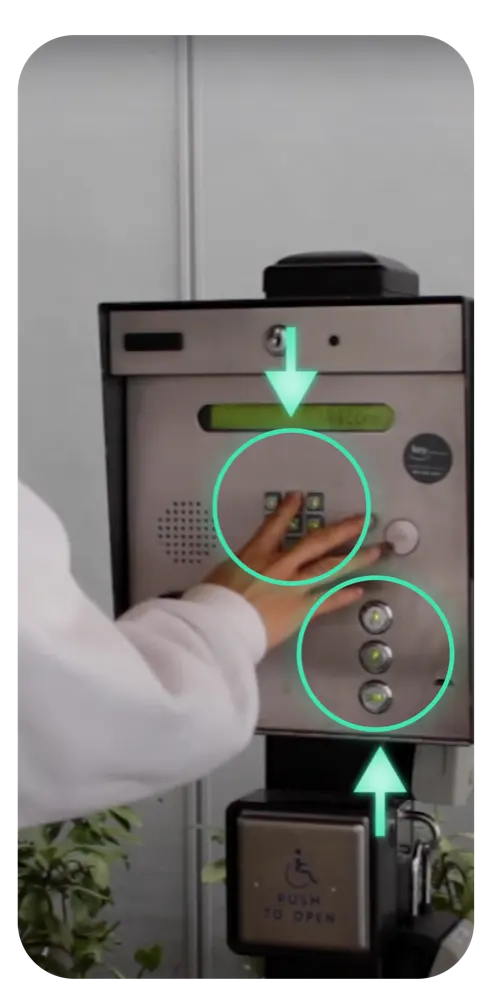
A visitor dialing a unit on an apartment buzzer panel

2. Visitor dials your unit

Your visitor dials your unit from the buzzer, either with your unit code or the buzzer directory.

If a passcode is set by BuzzerAPI, they enter the code when prompted.

3. Visitor is buzzed in

buzzerapi opens the door on your behalf. Your agent sees every entry in your access log and lets you know they've arrived.

Use Cases

How people use buzzerapi

Let your AI agent manage access for deliveries, guests, and regular visitors.

Timed unlock

Package & food delivery

Open a timed access window for a package or food delivery. When the driver dials your unit during that window, they’re buzzed in.

Weekly routines

Cleaners, pet sitters & dog walkers

Schedule weekly access windows for regular visitors. Review and revoke them when plans change.

Guest passcodes

Guests & short-term rentals

Create a four-digit code with an expiry and use limit for a guest or booking. Guests dial your unit, then enter the code when prompted.

REST API

AI agents & integrations

Have your AI agent, app, or home automation platform create passcodes, schedule access, check logs, and receive signed webhooks with a scoped API key.

Access history

Improve security

Review recorded buzzer events and access attempts with timestamps.

Companion app

Real-time notifications

Get push notifications when someone buzzes, and view your access history in the Lowkey companion app.

Multiple buildings

Hosts & multiple units

Manage multiple call boxes from one account, each with its own virtual number.

Setup Process

Get started with buzzerapi today in three easy steps.

buzzerapi provides you a virtual phone number which will interface securely with your existing buzzer system.

1. Get a virtual phone number

Purchase a buzzerapi subscription to receive a virtual number

2. Send to your property manager

Send the virtual number to your property manager to have the buzzer dial this number rather than your personal phone

3. Start using buzzerapi

Once the buzzer is configured, have your AI agent use buzzerapi to control your building door

Pricing

Try the API free before connecting your building.

Create an account and give your AI agent a free API key. A paid subscription is required to receive a virtual phone number to connect to your buzzer.

buzzerapi

Allow your AI agent to let in packages, food deliveries, guests, pet sitters, and more

  • Test the API for free
  • Virtual number to connect your call box
  • Configure time restricted or recurring access
  • Create secure access codes for recurring or single use
  • View access history
  • Companion Lowkey mobile app with push notifications

$2 / week billed annually (save 50%)or$4 / week

Billing starts only when you choose to connect a building.

Need to manage multiple buildings? Learn more in the full API Reference

API Quickstart

Everything your AI agent needs to manage building access

See the requests behind common visitor access flows, or browse the complete REST reference for every operation.

Create a visitor passcode

A guest calls your unit and enters a 4 digit code when prompted.

curl -X POST https://api.buzzerapi.com/v1/buildings/BUILDING_ID/unlock \
  -H "Authorization: Bearer YOUR_API_KEY" \
  -H "Idempotency-Key: guest-passcode-001" \
  -H "Content-Type: application/json" \
  -d '{"type":"passcode","enabled":true,"access_code":"2580","expires_in_minutes":60,"remaining_uses":1,"label":"Guest"}'

Allow a delivery at a specific time

A timer lets a visitor in during a predetermined window when they call your unit. Set starts_at and ends_at to the delivery window, here 1 to 3 PM.

curl -X POST https://api.buzzerapi.com/v1/buildings/BUILDING_ID/unlock \
  -H "Authorization: Bearer YOUR_API_KEY" \
  -H "Idempotency-Key: delivery-window-001" \
  -H "Content-Type: application/json" \
  -d '{"type":"timer","enabled":true,"starts_at":"YYYY-MM-DDT13:00:00-07:00","ends_at":"YYYY-MM-DDT15:00:00-07:00","label":"Package delivery"}'

Schedule weekly recurring access

Give a cleaner or dog walker a recurring access window. Add an optional access_code so callers must enter it during the window.

curl -X POST https://api.buzzerapi.com/v1/buildings/BUILDING_ID/unlock \
  -H "Authorization: Bearer YOUR_API_KEY" \
  -H "Idempotency-Key: weekly-cleaner-001" \
  -H "Content-Type: application/json" \
  -d '{"type":"routine","enabled":true,"days":["monday","tuesday","wednesday","thursday","friday"],"start_hour_and_minutes":"09:00","end_hour_and_minutes":"17:00","timezone":"America/Los_Angeles","access_code":"2468","label":"Cleaner"}'

Check access logs

Search recent access attempts by name with q and see whether each one succeeded. Use the returned pagination cursor to fetch older activity.

curl "https://api.buzzerapi.com/v1/buildings/BUILDING_ID/logs?q=delivery&limit=20" \
  -H "Authorization: Bearer YOUR_API_KEY"

More endpoints

For AI agents

Give OpenClaw the setup.

Add BuzzerAPI requests to your OpenClaw API-tool workflow and keep the key in protected credentials. Start by reading account and building setup, then approve the specific access rule before allowing the workflow to write it. Copy the setup prompt below to get started.

Try asking OpenClaw: OpenClaw, help me inspect my building setup, then prepare a guest code. Show me the proposed building and access limits before creating anything.

OpenClaw setup prompt
OpenClaw, help me set up BuzzerAPI to let authorized visitors into my apartment or condo through a call box that dials a phone number.

Use the official AI agent guide at https://www.buzzerapi.com/agents.md and REST reference at https://www.buzzerapi.com/api-reference. Start at https://www.buzzerapi.com/openclaw/#pricing so I can create a free account and verify my email myself. I will give you the API key after it is issued. Keep it in protected credentials as BUZZER_API_KEY; never print it, put it in a URL, or commit it.

First, check https://api.buzzerapi.com/v1/health, then use the key to inspect GET /v1/account and GET /v1/billing/plans. Tell me what I can test without paying. If the public API is unavailable, tell me plainly and use the website account page to check readiness. Do not invent results.

Only when I ask to connect a building, request hosted checkout for the plan I choose and return its URL for me to complete payment. Verify an active subscription and provisioned number before guiding me through building-manager setup and a physical entrance test. Ask before creating any access rule.

When I am ready to ask my property manager to have my unit's buzzer call the virtual number, draft this email for me. Replace VIRTUAL_NUMBER with the building's virtual_number from GET /v1/buildings/{buildingId}/setup, written as a normal phone number. Show me the draft to send myself; do not send it unless I ask.

Subject: RE: Changing my buzzer number

Hi,

Would you please change the phone number for my buzzer to VIRTUAL_NUMBER?

Thank you!