
Now in private beta

Stop missing
packages.

Control your apartment or condo buzzer with a REST API.
Timed unlocks, guest passcodes, and recurring schedules.
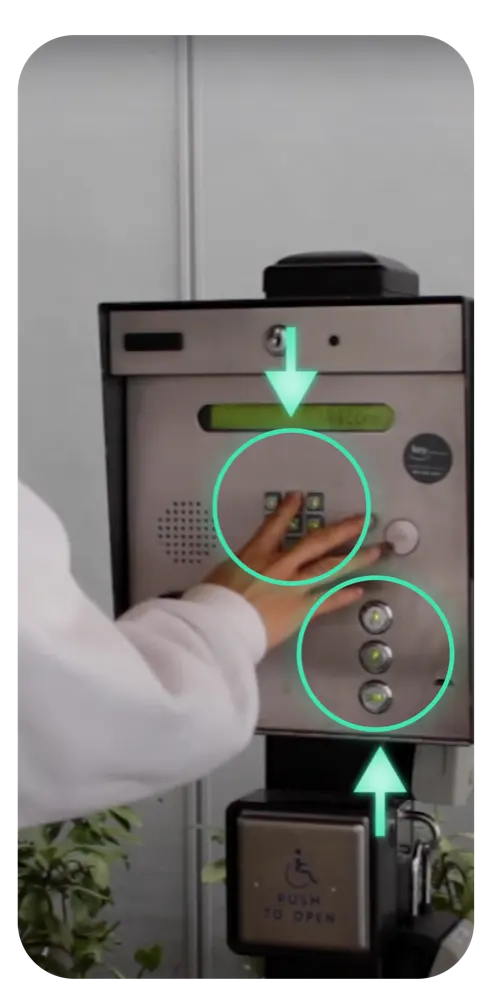
Works with call boxes that dial a phone number. Your building must forward calls to your Lowkey number and you must test at the entrance.

unlock.sh
POST /v1/unlock
Authorization: Bearer sk_live_...
Idempotency-Key: delivery-window-1234
{ "type": "timer", "duration_minutes": 15 }

// → 201 { "type": "timer", "status": "active", ... }
How It Works
Connect a phone-based buzzer. No new building hardware required.
buzzerapi works with call boxes that dial a phone number. Your building manager must update the number your unit calls. We provision your Lowkey number after your subscription activates, then you test the connection at the entrance.
01

Get a Virtual Number

After subscription activation, we provision a Lowkey phone number. Ask your building manager to set it as your unit’s call-box destination.

02

Get Your API Key

Sign in with an email code and create a scoped API key for your agent or application. Keep the key in its secret settings.

03

Automate Your Access

Set a timer for your next delivery. Create a passcode for tonight's guests. Premium also supports recurring schedules. Test the buzzer before relying on any rule.

Use Cases
How people use buzzerapi
From solo renters to property managers — here's what gets built with the API.
[ ]

Package & Food Delivery

Expecting a delivery? Create a 30-minute timer rule. When the driver calls your configured unit during that window, Lowkey can accept the call. Test your building’s door-release tone first.

/\

Airbnb & Short-Term Rentals

Create a four-digit visitor passcode for a guest booking, with a use limit and expiry. On the Multi Building plan, one parent-account key can manage your linked building numbers with explicit building selection.

~*

Pet Sitters & Dog Walkers

On Premium, schedule an access window for a regular visitor such as a dog walker. Revoke the rule when plans change.

</>

Developer Integrations

Use a scoped API key from your application or agent to create and revoke access rules for a connected unit. Subscription and physical setup are required.

{~}

Home Automation

Connect an automation platform that can make HTTP requests to the BuzzerAPI service. Keep your access key secret and apply the same visitor approval rules you use manually.

Features
Built for every way you use your buzzer.
Package deliveries, food orders, guest access, recurring services — buzzerapi handles them all programmatically.
[~]

Timer Unlock

Expecting a package or food delivery? Create a timed access window. When the driver dials your configured unit, Lowkey can accept the call during that window.

#_

Guest Passcodes

Friends coming over? Create a four-digit code with an expiry and use limit. They dial your unit, then enter the code when prompted. Test it at the building entrance first.

@:

Weekly Routines

Premium supports weekly access windows for regular visitors. Review and revoke schedules when your needs change.

>>

Roommate Sharing

The Lowkey app supports household sharing on eligible plans. Agent API keys are scoped separately from billing and account setup.

{}

Access History

Review recorded buzzer events and access attempts with timestamps. A call record does not verify that a visitor physically entered.

->

Real-Time Webhooks

Configure a webhook for supported buzzer events and receive signed deliveries at your HTTPS endpoint.

(!)

Access Activity

Use the Lowkey app or API logs to review recorded access activity. Physical entry must be verified at the building.

##

Airbnb & Property Management

Manage guest access across linked buildings on the Multi Building plan. Select each building explicitly in the API or CLI; its rules, logs, and callbacks stay separate.

Built for agents

Let an AI agent handle the buzzer.

For deliveries, guests, cleaners, and dog walkers, your agent can create a timed access window or a four-digit visitor code for a phone-based apartment or condo call box. You control the subscription, building setup, and scoped API key.

01 / subscribe

Compare current prices, sign in with email, and finish Stripe hosted checkout.

02 / connect

Set the building call box to your provisioned phone number and test a real call.

03 / delegate

Create a scoped agent key and put it in the connector’s secret settings.

Set up your account →
Pricing

Choose the access your building needs.

Current monthly and yearly prices come directly from Lowkey’s Stripe plans. Your subscription must activate before access can be created. Cancel or change an existing plan in the billing portal.

Standard

Timed access windows and visitor passcodes for one configured buzzer number. Monthly and yearly billing available.

Loading current prices…

Sign in & subscribe →
Premium

Timed access, visitor passcodes, and weekly routines for one configured buzzer number. Monthly and yearly billing available.

Loading current prices…

Sign in & subscribe →

Managing multiple buildings? Subscribe to Multi Building in the Lowkey app, then add, remove, and control each building through the API or CLI.

API quickstart

Give your agent the right key.

After subscription activation, create a scoped agent key in your account. A new access rule requires an Idempotency-Key so a retry cannot silently create a second rule. Use your connected service origin; the public API hostname will be enabled when the backend launches.

curl -X POST "$BUZZER_BASE_URL/v1/unlock" \
  -H "Authorization: Bearer $BUZZER_API_KEY" \
  -H "Idempotency-Key: your-stable-request-id-1234" \
  -H "Content-Type: application/json" \
  -d '{"type":"timer","duration_minutes":15,"label":"Package delivery"}'

Need visitor access instead? Use type: passcode with an optional one-to-four-digit code, an expiry, and a use limit. The API generates a four-digit code when you omit it. Weekly routines require Premium. Test the call box before trusting any rule.